Content Library
One source of truth for every response
The RocketDocs content library centralizes every approved answer your team has ever written. Tag content by product, region, or line of business. Assign review cycles so nothing goes stale. Track ownership so every record has an SME accountable for it.
What the content library does
Replace the SharePoint folder. Start with the answer.
Most response teams have content scattered across SharePoint folders, old Word documents, email chains, and chat threads. While you may not be able to find it, you know that SME answered the same question two years ago. It is because of this paradigm that the first hour of every RFP gets spent finding the right answer, then the next hour gets spent confirming it is still accurate.
The RocketDocs content library replaces that pattern with one centralized, governed knowledge base. Every approved answer lives in one place. Every record has an owner, an SME, a review cycle, and a complete history. The first hour of every RFP starts with the content library, not with a search through folders.
How content is organized
Four levels of structure, infinitely flexible
Libraries
Top-level groupings for your business. Multi-affiliate firms can structure libraries by line of business, by region, or by product. Permissions enforce who sees what at the library level.
Topics and subtopics
Within each library, content is organized by topic and subtopic. The structure mirrors how your team actually thinks about the business. Search and filters operate across topics so finding the right answer is fast even when libraries are large.
Custom attributes and tags
Beyond library and topics, every content record can be tagged with other custom attributes specific to your business: product line, geography, customer segment, regulatory framework, language, or any other dimension that matters to you.
Content records
A content record is the fundamental unit. Each record has a question (or topic), an answer, a status (Draft, Under Review, Published, Expired), an owner, an SME, a review date, and a complete version history. Records can include images, diagrams, charts, tables, and appendices.
Search
Search that finds what you need
Speed of search is the difference between using the library and going around it. RocketDocs search supports keyword and semantic matching, advanced filters, and saved queries.
- Keyword search across question, answer, and metadata
- Filter by library, topic, attribute, status, owner, or review date
- Sort by relevance, recency, or any custom field
- Browser extension brings the library to any web form, anywhere
Content review cycles
The silent failure mode of every library: stale content
Stale content is the silent failure mode of every content library. RocketDocs prevents it with built-in review cycles.
- Set expiration dates on every content record
- Automatic notifications go to record owners ahead of expiration
- Bulk reassignment when SMEs change roles
- Status flags surface stale, expiring, or under-review content at a glance
- Reporting shows library health by SME and review status
Audit trail
Audit trail and version history
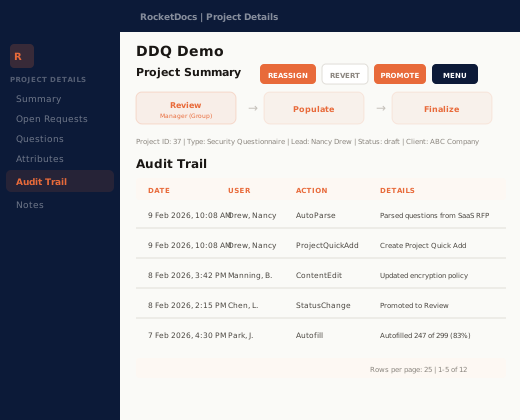
Every action on a content record is logged. Who created it. Who edited it. Who approved it. When each change was made. What was changed. The history is immutable, exportable, and queryable for compliance review. When the auditor asks who approved the answer that was sent to the customer in question 47 of last year's DDQ, the answer is in the platform.
- Immutable per-record version history
- Full diff tracking on every edit
- Exportable audit reports for compliance review
- Queryable by user, content record, or date range
What customers say
Trusted by the teams whose responses cannot be wrong
Things that could have taken a half an hour can now take possibly a minute. It is absolutely a massive time saver in keeping hundreds and hundreds of answers ready to go for us to use.
Our project load has consistently increased year over year for many years. I tie our ability to keep meeting that, without hiring more people, to RocketDocs.
Not only are sales representatives creating better proposals, but they’re also doing it in a fraction of the time it used to take, which frees them up to spend more time in front of customers or to pursue more sales opportunities.
FAQ
Frequently asked questions
How many content records can the library hold?
There is no practical limit on library size. Customers run libraries with tens of thousands of records across multiple lines of business and geographies. Performance is engineered for enterprise scale.
Can multiple teams share the same library?
Yes. Libraries can be structured to support multiple teams, lines of business, or geographies, with permissions enforced at the library, or attribute levels. Shared libraries enable cross-team reuse of approved content while permissions keep restricted content from being accessed.
What happens to expired content?
Expired content is flagged but not deleted. It remains in the audit trail and version history. The SME is notified. You can choose to exclude expired and under review content from searches and autofills or use them as reference points that need to be verified before use.
Can I import existing content from SharePoint, Word documents, or another platform?
Yes. The RocketDocs implementation team handles content migration during onboarding, including import from SharePoint, Word and Excel files, and other response management platforms. Most customers complete the migration within 4 weeks.
Does the content library support multiple languages?
Yes, with limits. Content records can be created in any language. Search and filtering work across languages. Multi-language native AI generation has limits and has been prioritized in the product roadmap.
How are images, charts, and diagrams handled?
Content records can include images, diagrams, charts, tables, and other appendices. These attachments are managed through the same review and approval workflows as text content, so visual assets stay current together with the answers they support.
Free resource
See what RocketDocs could save you
Calculate your response ROI. Four questions on response volume, complexity, and effort, and what RocketDocs could save you.
Ready to see the library in action?
A specialist will demonstrate the library structure, search experience, and review workflows using examples from your industry and use case.