LaunchPad
Work in Word and Excel. Skip the learning curve.
LaunchPad is RocketDocs inside Microsoft Word and Excel. Your team searches the library, autofills responses, and locks down final formatting without ever leaving the document they are already working in. Zero re-platforming. Zero new interfaces. Native Microsoft 365 throughout.
What LaunchPad does
The platform comes to the document
Most response management platforms force your team into a separate web application. They draft in the platform, then export to Word or Excel for final review. The export is where formatting breaks, brand standards drift, and last-minute reformatting eats the time you saved on drafting.
LaunchPad eliminates that pattern. The full RocketDocs experience runs as a Microsoft 365 add-in, inside Word and Excel. Your team works in the document. The platform comes to them.
LaunchPad for Word
How LaunchPad works in Microsoft Word
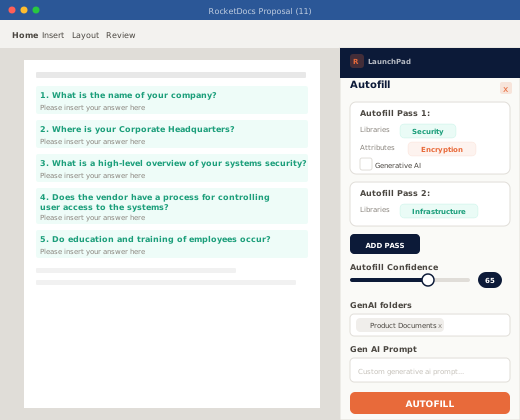
Open a Word document. Open the LaunchPad pane. RocketDocs capabilities are available in the document, with zero context switching.
- Search your content library with advanced filtering, by product, region, line of business, or any other custom attribute
- Insert approved answers directly into the document with one click
- Run generative AI to draft responses for new or unmatched questions
- Assign sections to subject matter experts or other teammates without leaving Word
- Suggest edits to the content library while you are working, so the library stays current
- Export the finished document with formatting, structure, and styles preserved
LaunchPad for Excel
How LaunchPad works in Microsoft Excel
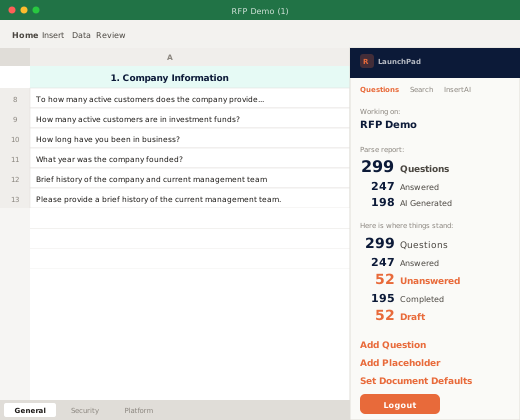
Excel is where most security questionnaires and DDQs actually live. SIG, CAIQ, NIST 800-171, vendor questionnaires, custom assessments, all of them ship as multi-tab Excel files. LaunchPad handles them natively. No other major response management platform handles multi-tab Excel files this way. For security teams that live in Excel, this is the difference between hours and days.
- Choose which tabs to include and which to exclude before processing
- Configure response placement per tab, so each section places answers where it expects them
- Filter content by topic area to surface the right answers fast
- Use the full content library, autofill, and generative AI from inside Excel
- Export the completed file with full formatting and structure intact
Why Office-native
Why teams choose Office-native
Three reasons.
Zero training overhead
Your team already knows Word and Excel. No new platform interface to learn. No refresher training when someone joins. The shortest possible path from contract signing to live response.
Format-preserving exports
When the response is drafted, reviewed, and approved inside Word or Excel, the export is the document. No conversion step. No formatting drift. No rebuilding the brand template at the end of every project.
Faster collaboration with Microsoft 365
SharePoint, OneDrive, and Teams integrations work out of the box. Your team's existing collaboration patterns continue to work. RocketDocs slots into the workflow, instead of replacing it.
The full platform
LaunchPad and the rest of the platform
LaunchPad is the entry point, not the whole platform. Behind the add-in, the full RocketDocs platform handles project management, approval workflows, audit trails, and analytics. Your team gets the simplicity of Word and Excel at the surface and the governance of an enterprise response management platform underneath.
What customers say
Trusted by the teams whose responses cannot be wrong
Things that could have taken a half an hour can now take possibly a minute. It is absolutely a massive time saver in keeping hundreds and hundreds of answers ready to go for us to use.
Our project load has consistently increased year over year for many years. I tie our ability to keep meeting that, without hiring more people, to RocketDocs.
Not only are sales representatives creating better proposals, but they’re also doing it in a fraction of the time it used to take, which frees them up to spend more time in front of customers or to pursue more sales opportunities.
FAQ
Frequently asked questions
Is LaunchPad a separate product?
No. LaunchPad is included with the RocketDocs platform. It is the Microsoft 365 add-in that connects Word and Excel to the platform.
Which versions of Word and Excel are supported?
LaunchPad supports current versions of Microsoft 365 across Windows, Mac, and the web. For specific version compatibility, talk to a specialist.
Do users need their own Microsoft 365 license?
Yes. Users need a current Microsoft 365 license to use the LaunchPad. RocketDocs provides the add-in. Microsoft provides the underlying Office applications.
How does multi-tab Excel handling work?
When you open a multi-tab Excel questionnaire in LaunchPad, you choose which tabs to include and where the responses should be placed within each tab. The system processes each tab according to your configuration. This handles security questionnaires like SIG and CAIQ, vendor assessments, and any custom multi-tab format.
Will LaunchPad change our document formatting?
No. LaunchPad preserves the original document's formatting, structure, and styles. The exported file matches the input file. There is no conversion or reformatting step that introduces style drift.
Can we still use the RocketDocs web platform?
Yes. LaunchPad and the web platform share the same content library, projects, workflows, and audit trail. Most teams use both: LaunchPad for active drafting and review, the web platform for content management, project oversight, and reporting.
Does LaunchPad work offline?
LaunchPad requires an active connection to access the content library, run generative AI, and update project status. Standard Microsoft 365 offline editing is supported, with synchronization when the connection is restored.
Free resource
Calculate your payback
Calculate your response ROI. Four questions on response volume, complexity, and effort, and what RocketDocs could save you.
Ready to see LaunchPad in Word and Excel?
A specialist will demonstrate LaunchPad on a real questionnaire from your team's workflow, in real time.