
RFP software for tech firms: 5 features that matter
The technology industry runs at a pace most sectors never match. Product cycles compress. Competitive landscapes shift quarterly. Amid that relentless pressure, the administrative burden of responding to RFPs, RFIs, DDQs, and security questionnaires can drain the time and attention your team needs for higher-value work.
Choosing the right RFP software is not simply a matter of picking the most feature-rich option available. It is about finding a platform that fits how technology companies actually operate: fast-moving, cross-functional, and intolerant of wasted cycles. The features below are not a checklist of nice-to-haves. They are the capabilities that separate a tool your team will adopt from one that collects dust after onboarding.

Unlimited free SME access
Subject matter experts are the people who know your product, your security posture, your compliance certifications, and your pricing structures. Without them, no RFP response is complete or credible. But in most technology companies, SMEs sit outside the proposal team. They have their own deadlines, their own priorities, and no particular appetite for learning a new tool just to answer a handful of questions.
RFP software that charges per seat punishes you for involving the right people. Your proposal manager ends up playing intermediary, copying answers out of email threads and pasting them into the platform manually. That is slow, error-prone, and completely avoidable.
Look for a platform that offers unlimited free SME access so that product managers, security engineers, legal reviewers, and finance leads can all be brought in without triggering a licensing conversation. The goal is to make it easy for the right people to contribute before the deadline lands, not after.
Ability to work in your native tools
Technology teams are often held to a higher standard when it comes to tooling expectations. Ironically, that makes onboarding friction even more damaging. If your RFP platform requires users to log into a separate web app, learn a new interface, and change how they work, adoption will stall.
The most effective RFP solutions for technology companies allow teams to work natively inside Microsoft Word and Microsoft Excel, which are already embedded in daily workflows. An add-in that surfaces content library results, autofill suggestions, and project context directly inside those tools eliminates the learning curve for contributors who only touch a proposal occasionally.
This matters most for SMEs and reviewers who participate in one or two proposals per quarter. Asking them to onboard to a standalone platform for that level of involvement is a barrier that compounds across every proposal cycle. Removing it means faster participation and fewer delays waiting on people who are technically available but practically unreachable.
For teams that respond to Excel-based questionnaires, native Excel support is especially valuable. Rather than exporting, copying, and reformatting, contributors work directly in the document the issuer sent, with platform intelligence surfaced right alongside their cells.
Autofill capability
The majority of questions in any given RFP have been answered before. Company overview, security certifications, integration capabilities, pricing structure, support model: these answers exist somewhere in your organization. The question is how fast your team can find, verify, and place them.
Manual searching through old proposals, shared drives, or email archives is the default for teams without a purpose-built content library and autofill capability. That default is slow, inconsistent, and risky. Different team members pull different versions of the same answer, and nothing guarantees the one they find is still current.
Autofill built on a governed content library changes that dynamic. When a new question arrives, the platform matches it against your library of approved, up-to-date answers and surfaces the best options at the click of a button. Your team reviews and confirms rather than drafts from scratch. The hours saved on recurring questions are hours redirected toward the complex, differentiating answers that actually move evaluators.
For technology companies that respond to similar security questionnaires or RFIs across multiple prospects, this efficiency compounds quickly. The tenth time you answer a question about your SOC 2 status or your disaster recovery process should take seconds, not minutes.
AI and smart response technology
Speed and accuracy are not a trade-off. Modern AI technology, applied correctly in an RFP context, helps your team find the right answer faster without sacrificing the quality review that keeps responses compliant and on-brand.
The most useful AI capability in an RFP platform is not one that generates answers from scratch. It is one that searches your approved content library intelligently, surfaces the most relevant existing responses, and flags when a question may not have a strong match in your library so a human can intervene. That keeps AI in a supporting role where it belongs in regulated, compliance-sensitive contexts, while still accelerating the process dramatically.
For technology companies, AI is also particularly useful for parsing incoming documents. When an RFP or security questionnaire arrives as a multi-tab Excel file or a lengthy Word document, intelligent parsing can extract and organize questions automatically, routing them to the right people without manual sorting. According to the Association of Proposal Management Professionals, organizations that automate repetitive proposal tasks consistently report shorter response cycles and higher team capacity for strategic work. You can review APMP's published research at apmp.org.
Customizable workflows
No two technology companies run their proposal process the same way. A startup responding to its first enterprise RFP operates differently than a mature SaaS vendor managing fifty concurrent proposals. Your RFP platform needs to adapt to your process, not the other way around.
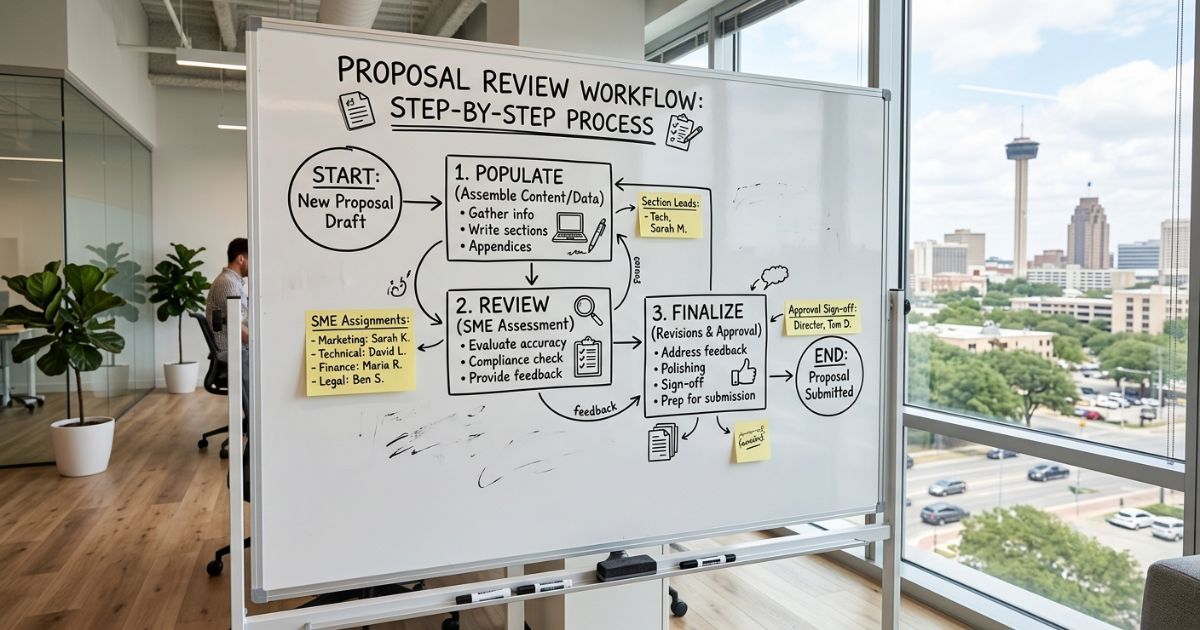
Customizable workflows let you define who owns each stage of a response, what approvals are required before content is finalized, and how deadlines cascade across contributors. That structure does more than keep projects organized. It creates accountability without micromanagement. When everyone can see the current status of a proposal, which sections are complete, which are still in draft, and who is responsible for what, progress happens faster and fewer things slip through.
Workflow customization is also essential for compliance. Technology companies selling into regulated industries, financial services, healthcare, or government face reviewers who expect consistent, accurate responses. A workflow that enforces a content review and approval step before anything is submitted protects you from the version control problems that plague teams still working from shared drives and email chains.
Deadline tracking tied to workflow stages gives proposal managers a real-time view of where a response stands relative to the submission date. That visibility allows early intervention when a bottleneck develops, rather than a scramble in the final hours. The RFP Foundation's best practices guide covers workflow design principles that apply directly to technology vendor proposals and is available at rfpfoundation.org.
For teams managing multiple active proposals at once, this kind of visibility across projects is what separates sustainable proposal operations from constant firefighting.
How these features work together
Each of the five capabilities above addresses a specific failure point in the manual proposal process. But their real value emerges when they operate as a connected system. Unlimited SME access means you have the right contributors. Native tool support means they will actually show up. Autofill and AI acceleration means the volume of work does not overwhelm the timeline. And customizable workflows mean nothing falls through the cracks on the way to submission.
Technology companies that build their RFP process on that foundation consistently report shorter cycle times, more consistent response quality, and less burnout on proposal teams. RocketDocs is built around exactly that model. You can see how the platform handles workflow management, explore its content library capabilities, and review how LaunchPad brings the platform directly into Word and Excel.
If your current process relies on manual searching, seat-limited tools, or workflows managed through email threads, the cost is visible in every proposal cycle. The right platform does not just make RFPs easier. It makes winning them more consistent.
Ready to see how RocketDocs fits a technology company's proposal workflow? Schedule a demo and we will walk through your specific process together.
Looking for the platform behind this? See the RocketDocs platform or book a demo.


