
What Is New in RocketDocs 2.68.0
LaunchPad
LaunchPad: Mark Questions in Bulk
Not every row in a questionnaire is a question. Cover pages, instruction blocks, legal disclaimers, and section headers take up space in a project but require no response. Before this release, teams had to scroll through those rows and handle individually.
With bulk question marking now available in LaunchPad for Word, users can now select multiple questions or entire sections simultaneously. Once a selection is made, you can navigate to the questions tab giving immediate access to mark questions. Teams working through long questionnaires with long introductions will feel this improvement immediately.
Projects
Projects: Simplify Excel
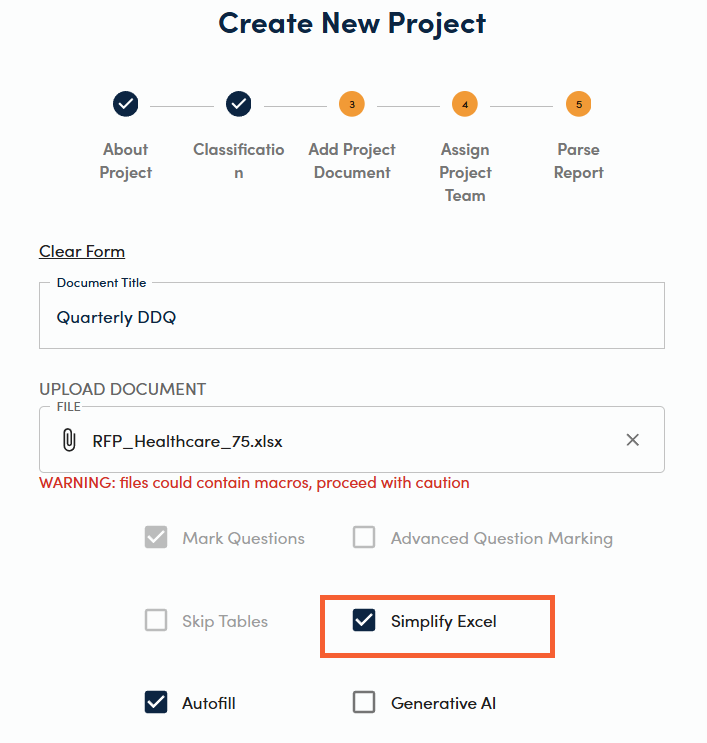
Heavily formatted Excel files have long been a source of friction for proposal teams. Merged cells, nested drop-downs, and conditional formatting can block autofill and generative AI features from running at all, forcing teams to manually clean up files before they can process a single question.
With 2.68.0, RocketDocs introduces the Simplify Excel option. When you encounter a complex Excel questionnaire, you can now generate a streamlined version for processing directly inside RocketDocs. The simplified version preserves the content you need while stripping out the formatting that gets in the way, so your autofill and AI tools work on the full questionnaire without manual prep work.
This is especially valuable for teams responding to DDQs and security questionnaires, which frequently arrive as dense, heavily formatted Excel files from enterprise and financial-services buyers, where the original formatting does not need to be retained for submission.
Integrations
SharePoint: Limit RocketDocs Access
The RocketDocs SharePoint integration is a powerful way to save your project documents directly on your SharePoint drive for easy access. But not every SharePoint site is for proposals, and unrestricted access can create both security and an organizational risk.
Administrators can now define exactly which SharePoint sites the RocketDocs app is permitted to access. Folders outside those boundaries stays out of scope, so RocketDocs can only access relevant locations and sensitive data in unrelated sites is not exposed through the integration.
To enable this limited SharePoint access, contact your Customer Success Manager or submit a support request. You can also review the full SharePoint access limitation support article for configuration details..
Administration
Notifications: Additional Reminders for Assignments
Missing a deadline is easy when the only notification arrives at the moment of assignment. With 2.68.0, administrators can now configure multiple reminders at custom intervals leading up to a due date. Enter day values separated by commas, for example 7, 3, 1, and RocketDocs will send a reminder at each interval for outstanding assignments.
This gives teams the ability to get what they need, eliminating the need for chasing.
Notifications: Past Due Reminders
Stale content and past due questionnaires are a risk . An answer that was accurate six months ago may no longer reflect your organization's current certifications, headcount, pricing, or compliance posture. A late questionnaire submission can lead to a termination.
Past due reminders close that gap. Administrators set a recurring interval measured in days, and RocketDocs automatically notifies assignees when assignments are past the due date. The result is a content library that stays current and projects that get submitted in a more timely manner.
This feature pairs directly with the assignment reminder improvement above, giving administrators a full notification layer from initial assignment through completion.
Release Summary
| FEATURE | AREA | WHAT IT DOES |
|---|---|---|
| Simplify Excel | Projects | Strips complex formatting so AI and autofill can run on complex Excel questionnaires |
| Mark Questions in Bulk | LaunchPad | Select and mark multiple questions or sections at once |
| SharePoint Access Limits | Integrations | Restricts which SharePoint sites RocketDocs can access |
| Additional Assignment Reminders | Administration | Sends multiple pre-due-date reminders for content and projects assignments |
| Past Due Reminders | Administration | Notifies content owners and project leads on a recurring interval when assignments are overdue |
How to Get These Features
All features in the 2.68.0 release are available to RocketDocs customers as of May 26, 2026. SharePoint access limiting requires administrator setup and must be enabled through your Customer Success Manager or via a support request. All notification settings can be managed in Notification Settings.
For a guided walkthrough, register for the live release webinar.
Looking for the platform behind this? See the RocketDocs platform or book a demo.


