
Security questionnaire automation is software that speeds up how teams answer vendor security assessments. It parses an incoming questionnaire in any format, matches each question against an approved library of past answers, autofills what it can, and routes the rest to the right expert. A human reviews every response before export. The result is faster turnaround with consistent, defensible answers.
If your team fills out SIG, CAIQ, or NIST questionnaires, you already know the pattern. A deal is close, procurement sends a spreadsheet with hundreds of questions, and the deadline lands on the security team. This guide explains how to answer security questionnaires faster, what automation can and cannot do, and how to evaluate the software without buying a black box.
Why security questionnaires keep piling up
A decade ago, a signed contract and a reference call could close an enterprise deal. Now every enterprise deal includes a vendor risk review. Procurement, legal, and security each get a say, and each wants evidence. The security questionnaire is how they collect it.
This is why volume exploded. The buyer's third-party risk program treats every vendor as a potential entry point, so the questionnaire goes out before signature and again at each renewal. Add regulatory pressure in finance, healthcare, and government, and a single account can generate several assessments a year.
A common misconception is that a SOC 2 report makes the questionnaires stop. It does not. Buyers still send the full questionnaire and ask you to attach the SOC 2 as supporting evidence. The report answers some controls, but the buyer's risk team maps its own framework to your answers and wants your words, in their format. For SaaS and enterprise technology vendors, the questionnaire has become a standing tax on the sales cycle rather than a one-time event.
The formats you will actually see
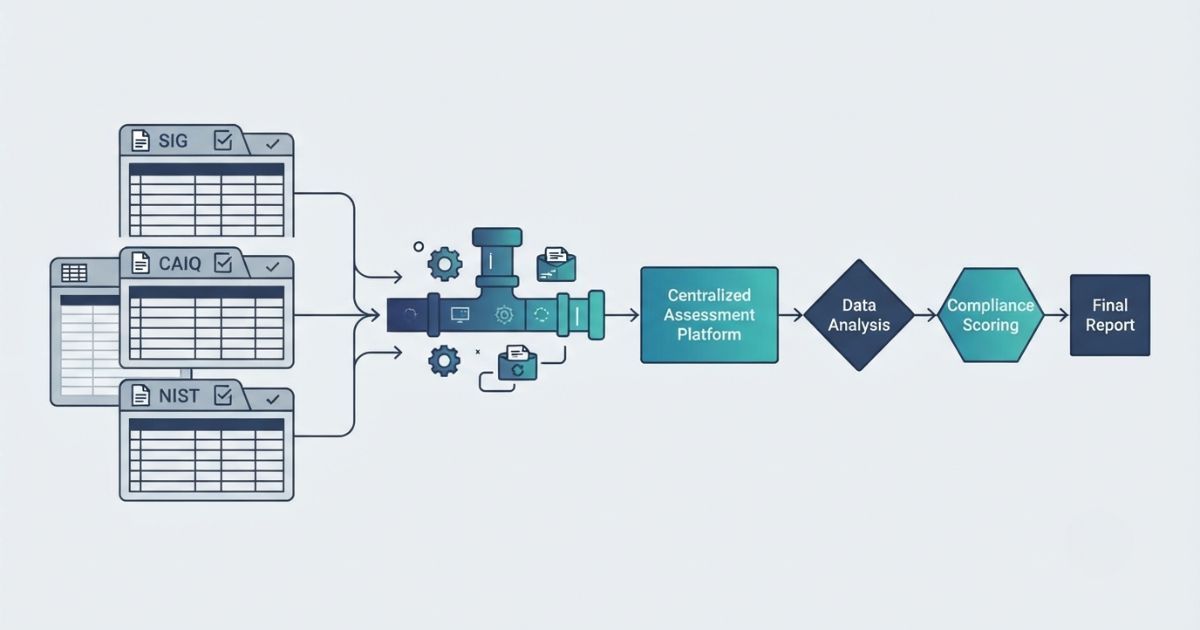
Most security questionnaires fall into a few families. Knowing them helps you plan reuse, because the underlying questions overlap heavily even when the wording changes.
- SIG and SIG Lite. The Standardized Information Gathering questionnaire from Shared Assessments is a large, industry-standard bank of questions across security domains. SIG Lite is the shorter subset that buyers send when they want a faster read.
- CAIQ and CAIQ Lite. The Consensus Assessments Initiative Questionnaire from the Cloud Security Alliance is built for cloud providers and maps to the CSA Cloud Controls Matrix. CAIQ Lite trims it down.
- NIST-based questionnaires. Some buyers, especially in government and defense supply chains, build assessments around NIST 800-171 or NIST 800-53 controls.
- Bespoke customer formats. Many enterprises maintain their own questionnaire, usually a multi-tab Excel workbook with a tab per domain, custom scoring, and locked cells. These are the ones that break generic tools.
Security questionnaires are close cousins of the due diligence questionnaires (DDQs) that finance teams complete, and the same reuse logic applies to both. Whatever the label, the format is almost always a spreadsheet, and the questions repeat from one sender to the next.
What the manual process actually costs
The manual process looks manageable for the first questionnaire and quietly turns expensive.
Start with the people. Answering a 300-question SIG pulls senior security engineers off their real work, and those same 300 questions come back the next quarter with minor edits. Highly paid staff spend days retyping answers they have already written.
Then there is version drift. When answers live in old email threads, past spreadsheets, and someone's personal folder, two people answer the same control two different ways. One says data is retained for 90 days, another says 30. Buyers notice contradictions, and every contradiction becomes a follow-up that delays the deal.
Finally there is deadline risk. Security questionnaires arrive with a hard date attached to revenue. When answers are scattered and reviewers are busy, teams miss the date or rush and send something wrong. Both are common.
What automation actually does, step by step
Automation does not mean a tool answers the questionnaire for you and hits send. It means the repetitive parts are handled by software so people spend their time only where judgment is required. The workflow looks like this.
- Parse any format. The tool ingests the incoming file, whether that is a SIG workbook, a CAIQ, or a custom multi-tab Excel sheet, and reads each question into a structured list.
- Autofill from an approved answer library. It matches each question against a governed library of previously approved answers and fills in every question it can confidently map. This is where reuse pays off, because most questions are ones you have answered before.
- Route the gaps to the right SME. Questions with no strong match, or that touch a control that changed, get assigned to the subject matter expert who owns that area, rather than landing on one overloaded person.
- Compliance review. A reviewer checks the drafted answers, confirms nothing is stale, and approves the set. Nothing goes out unread.
- Export in the sender's original format. The finished answers drop back into the buyer's exact workbook, preserving tabs, structure, and formatting, so you return the file they sent rather than a reformatted copy.
- Feed answers back. New and updated answers flow back into the library so the next questionnaire starts from a stronger base. The system improves with each response instead of starting from zero.
What automation does not do
Automation does not answer judgment questions for you. When a buyer asks whether your architecture is acceptable for their specific risk appetite, that is a human decision.
Automation does not invent controls you do not have. If you do not run a control, the correct answer is that you do not, possibly with a compensating control noted. A good tool surfaces the gap. It does not paper over it.
Automation does not make you honest. The audit trail records who wrote and approved each answer, which is exactly the point, because a security questionnaire is an attestation. The tool makes accurate answers faster to produce and easier to defend. It cannot make a false answer true.
Manual vs spreadsheet library vs purpose-built automation
Most teams pass through three stages. The table shows the trade-offs.
| Capability | Manual | Spreadsheet library | Purpose-built automation |
|---|---|---|---|
| Answer reuse | Copy and paste from old files | Central sheet to search | Automatic matching and autofill |
| Multi-tab Excel | Handled by hand | Handled by hand | Parsed and repopulated automatically |
| Consistency | Prone to version drift | Better, if maintained | Governed single source of truth |
| SME routing | Email and chase | Email and chase | Assigned and tracked in the tool |
| Audit trail | None | Manual notes | Immutable log of every change |
| Export fidelity | Manual reformatting | Manual reformatting | Format-preserving export |
| Effort by 4th questionnaire | Same as the first | Somewhat lower | Sharply lower |
A shared spreadsheet is a real improvement over nothing, and many teams stop there. The ceiling is that it still depends on people remembering to search it, keep it current, and reformat every export by hand. Purpose-built software to automate security questionnaires removes those manual steps and adds the governance that a regulated buyer expects to see.
How to evaluate security questionnaire software

If you are comparing vendor security assessment software, the demo will look impressive no matter what. Push on these five criteria, because they are where tools diverge.
Native multi-tab Excel handling. Ask the vendor to load one of your real multi-tab workbooks, not their sample. Watch whether it keeps each tab, respects locked cells and scoring, and exports the same structure. Many tools flatten everything into one list and hand back a file the buyer will not accept.
Where the AI runs, and whether your security answers leave your environment. Your questionnaire answers are a map of your controls, gaps, and architecture. Ask exactly where the AI processes that text. If the tool sends your content to a third-party model provider, your most sensitive security information leaves your environment. A privately hosted AI keeps that data inside a controlled boundary and out of any public model. This is the single most important question for a security buyer evaluating security questionnaire software.
Audit trail. You must be able to show who wrote each answer, who approved it, and when. Look for an immutable log, not editable notes.
Recurring questionnaire support. Since the same accounts send assessments every year, the tool should make re-answering a returning questionnaire fast, tracking what changed since last time rather than treating it as new.
Library governance. The library is only as trustworthy as its upkeep. Look for SME ownership of answers, scheduled review cycles, and the ability to lock approved content so nothing stale slips into a response.
How to roll it out
The fastest path to value is not a big configuration project. It is a good seed library.
Start with your last five completed questionnaires. They already contain your approved answers to the questions buyers actually ask, so importing them gives the system a working library on day one instead of a blank slate. Tag each answer with an owner and a review date as you load it.
From there, run your next live questionnaire through the tool, and assign real SME owners to the domains where you expect gaps. After two or three questionnaires, the library will cover most recurring questions, and the team's job shifts from writing to reviewing. That shift is where the time savings show up.
How RocketDocs automates security questionnaires
RocketDocs is a response management platform for regulated industries, in operation since 1994. It is built around the workflow above, with an emphasis on the privacy and governance that security and GRC teams require.
RocketDocs runs its own private AI, with a dedicated document store for each customer. Your data is never sent to public AI providers and never used to train any model. Astro works in three layers: exact-match autofill for questions you have answered before, similarity search for close matches, and generative drafting for the rest, with every generated answer flagged for human review.
The LaunchPad add-in handles security questionnaires inside Microsoft Word and Excel, including multi-tab Excel workbooks with per-tab response placement and format-preserving export, so the file goes back to the buyer in its original structure. A governed content library provides SME ownership and scheduled review cycles, approval workflows support lockdown of finished content, and every action is written to an immutable audit trail. RocketDocs is SOC 2 Type II certified and ISO 27001 certified, and it supports SIG and SIG Lite, CAIQ and CAIQ Lite, NIST 800-171, NIST 800-53, HIPAA assessments, PCI DSS readiness, vendor security assessments, and custom questionnaires.
RocketDocs reports roughly 50% faster turnaround and up to 95% content reuse for mature deployments, with the turnaround reduction typically arriving by the third or fourth response as the library fills in. The platform holds a 4.2 out of 5 rating on G2.
Looking for the platform behind this? See the RocketDocs platform or book a demo.


