
5 Features That Make RocketDocs Worth Every Minute
Most proposal software promises to save time. RocketDocs was built to change how your team works entirely. That distinction matters when you're evaluating a response management platform that will touch every RFP, DDQ, and client questionnaire your organization produces.
What follows is a look at five features that RocketDocs customers consistently point to as the ones that changed their workflow. These are not entry-level conveniences. They are structural advantages that affect team capacity, content quality, and win rates.

Flexible User Permissions That Scale Across Your Organization
Your content library is not just a resource for the proposal team. It is institutional knowledge, and it belongs to the whole organization.
RocketDocs supports multiple license types and a granular permissions framework that lets you decide exactly who can see what. Proposal contributors get full access. Sales or compliance teams get read-only or self-serve access to the answers they need without routing requests through the proposal team. Legal and HR can access their own relevant content without seeing anything outside their scope.
The practical result is that ad-hoc lookup requests drop significantly. Someone in sales needs a product overview for a prospect call. Someone in compliance needs to verify a standard disclosure. Instead of emailing the proposal manager, they open RocketDocs and find it themselves. The library does the work; your team does not have to.
For more on how permissions work across the platform, see the RocketDocs Content Library page.
| TEAM | PRIMARY USE CASE |
|---|---|
| Sales | Self-serve access to approved product and company content |
| Compliance | Retrieving standard disclosures and regulatory language |
| Legal | Accessing contract language and approved boilerplate |
| Human Resources | Sourcing approved bios and org chart content |
| Technology | Finding security and infrastructure Q&A |
Multiple Libraries for Complex Organizations
A single library works for a single team. Most organizations are more complicated than that.
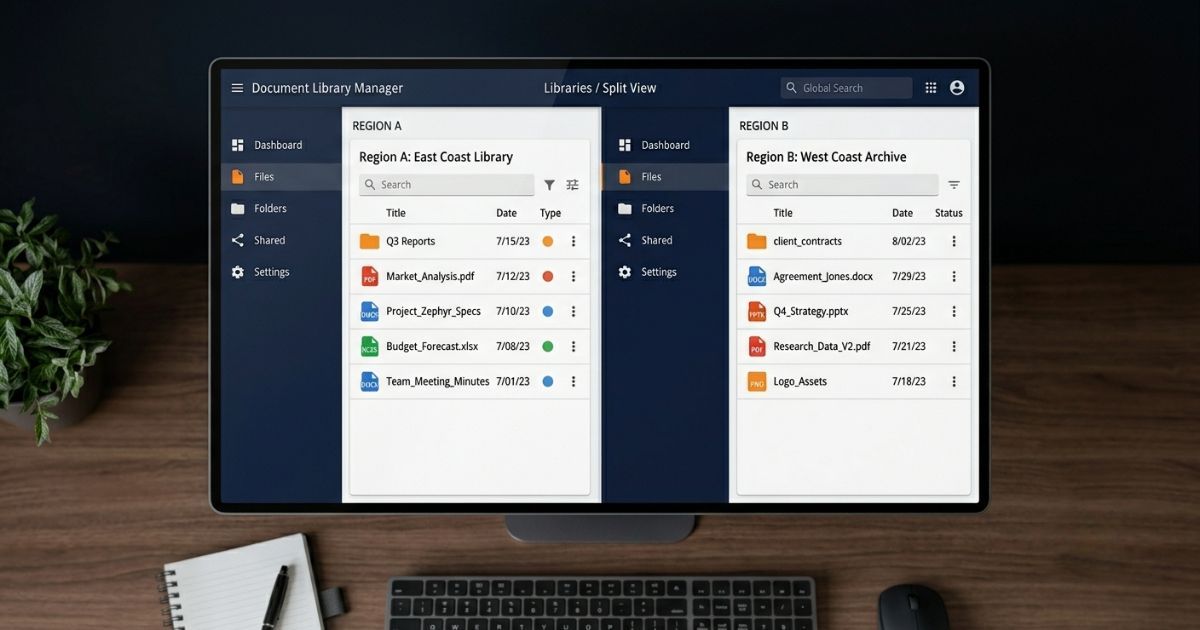
RocketDocs lets you run multiple discrete libraries within one platform. You can segment by region, business line, strategy, or team. A London-based proposal writer sees only the content relevant to their region. An asset management team works from a library scoped to their strategy without seeing content from a separate retail advisory team.
Beyond separating existing proposal teams, the multi-library structure opens the platform to business units that have never had a formal content repository. Compliance teams, communications departments, and HR groups can maintain their own curated libraries of approved content. Biographies, organizational charts, thought leadership, and standard disclosures all become searchable, maintained, and permission-controlled.
Every library is independently permission-managed. That combination of separation and control is something a single shared folder structure simply cannot provide.
RapidDocs: Branded Documents in Seconds
RapidDocs is RocketDocs' document assembly tool, and it is consistently one of the features that surprises new users most.
The concept is simple: you define a template, set up a few customization fields, connect it to your content library, and you have a tool that assembles a fully branded document in seconds. Company overviews, statements of work, fee proposals, standard RFIs, benefits summaries, and insurance plan reviews are common use cases. But the template structure is flexible enough that teams find new applications every time they see a demonstration.
The speed advantage is real. A document that previously required a proposal writer to locate content, draft, format, and review can be generated by someone without proposal experience in under a minute. That changes who can produce professional materials across your organization.
You can explore how RapidDocs fits into a broader response workflow on the RapidDocs platform page.
According to the Association of Proposal Management Professionals, proposal teams spend a significant portion of their time on document assembly and formatting rather than writing. Automating that layer returns meaningful capacity to the team. (Source: APMP Body of Knowledge)
One-Click Refresh for Recurring Questionnaires
Recurring questionnaires are one of the most common pressure points in response management. The DDQ that arrives every quarter. The annual compliance review from an existing client. The investor questionnaire that is 80 percent identical to last year's.
RocketDocs addresses this directly with a refresh function. When a recurring questionnaire comes in, one click loads the prior year's responses and maps them to the new version. The team reviews and updates what has changed rather than rebuilding from scratch.
The time savings are substantial, but the process improvement is just as important. Refresh forces a structured review of answers, which means your responses stay current rather than drifting toward outdated boilerplate. It also creates a natural audit trail: the prior version, the update, and who approved each change.
For teams managing high volumes of recurring investor DDQs, this feature alone often justifies the platform. See how RocketDocs approaches DDQ completion at scale.
Research from Broadridge indicates that asset managers are completing more DDQs per year than ever, with the average number increasing sharply as institutional due diligence requirements grow. (Source: Broadridge Insights)
Customizable Workflows That Match Your Process
Approval workflows in most tools are rigid. RocketDocs treats workflows as configurable, which makes a meaningful difference when your organization has processes that do not map to a generic template.
You can create an unlimited number of workflows. A simple one-step review for low-stakes content. A four-step sequential process for a regulated firm: draft, advisor review, compliance sign-off, and final approval. Different workflows for different document types. Each step tracked automatically within the platform.
The tracking piece matters as much as the configuration. When every step is logged, the project lead does not need to chase status updates manually. Notifications go to the right person at the right time. Bottlenecks become visible. The compliance review that has been sitting untouched for three days shows up in the system before it becomes a deadline problem.
For a detailed look at how workflows are structured in the platform, visit the RocketDocs Workflows page.
According to McKinsey, organizations that automate approval and review processes reduce administrative overhead by a measurable margin, with the greatest gains in teams managing high volumes of structured documents. (Source: McKinsey Digital)
| CHALLENGE | FEATURE THAT ADDRESSES IT |
|---|---|
| Ad-hoc content requests from non-proposal staff | Flexible user permissions |
| Multiple teams with different content needs | Multi-library structure |
| Slow branded document production | RapidDocs assembly tool |
| Time lost rebuilding recurring questionnaires | One-click refresh |
| Untracked review and approval cycles | Customizable workflows |
The Case for a Platform Built Around Your Content
Each of these features is useful on its own. Together, they form a platform that treats your content library as the center of gravity for everything your team produces. Permissions ensure the right people can access it. Multiple libraries ensure it stays organized at scale. RapidDocs makes it actionable in seconds. Refresh keeps it current. Workflows ensure every output from it has been properly reviewed.
That is not a collection of features. That is an integrated approach to response management.
If you want to see how these capabilities work together in practice, book a free demo and walk through the platform with someone who knows your use case.
Looking for the platform behind this? See the RocketDocs platform or book a demo.


